GeoIP is NOT acceptable

Hi all.

Forgive the incendiary headline.  I do consider GeoIP to have its legitimate uses, but please, bear with me and read on.

While my primary PC updates itself to Windows 10, I feel the need to express something that has been nagging me for a few years now.  Allow me to set the stage a little, so you can get to understand the depth of my pissed-offedness.

I am a US citizen, my primary language is Englilsh, though I have some high school/college Spanish, plus a smattering of Czech, Bulgarian, UK English (two cultures separated by a common language), and German.  I live overseas, and in the past eight years I’ve lived in Bulgaria, the UK, Czech Republic, and Germany, with several trips to Ukraine and Italy.

I manage software teams for a living.  Used to be a great developer, transitioned to management, now my coding is a bit rusty but I still can tell what’s done well…and what’s not.

And right now, I have yet to see, in my entire life (which encompasses doing software for longer than the Internet has been around), someone do GeoIP correctly.

I don’t mean doing stupid shit like calling the service nine times with every page load (seen that, dumb error, and the dummy that did it couldn’t for the life of him understand why he was racking up fifteen-k bills every month).  I mean something even stupider – basic UX.

Websites, applications, customer service lines, all these are connections to your company, right?

Well, users – when they are interacting with your company – are slowly coming to the conclusion that they’re tired of dealing with different connections.  They want one thing:  a coherent conversation.  They want to talk to your company in a single, contiguous conversation, as if they were talking to one single person.  In eComm terms, this is entitled “omni-channel” – no matter what angle of approach your customer takes, the connection they are using needs to have full knowledge of their entire conversation from whatever other angles that conversation may have taken place.

Now, back to where I was going before:  GeoIP.  For those who aren’t aware of what that is, if you visit a site or use an app that connects back to its vendor’s company servers, there’s a certain kind of software that can look at the IP address your client machine is using and get a pretty good idea of where that IP is based out of.  So it will know if you’re connecting from New York, or Beijing, or London, etc.

This is generally how a site decides what language to clothe itself with when you visit.  It checks the GeoIP and decides to use that region’s site face and language based on the result.

So I, personally, end up seeing a lot of German sites lately since I live in Germany.  That’s cool, I get it.  Once I’m there, I can usually find the language preferences and change over, or switch to a US English site or something.  If it’s a site that has user registration, they usually have a place to enter preferences on my account that includes language prefs (and big shame on them if they don’t have that).

Here’s where the Stoooooopid comes in:  too many companies are ignoring those preferences.  Big companies.  Companies that should f’ing well know better.

Like Microsoft.

I bought Windows 7 Ultimate for every one of my currently four PCs, just so I could pull down and install US English keyboard layouts and language packs.  I’ve been running them for what, six years now?

And Microsoft knows this.  Every account that I have tied to my address (and I’ve had the same email address at borkedcode for over a decade now) with Microsoft is set to English.

So this morning I bite the bullet, accept the license terms (in English), and press the buttons (all in English) to update to Windows 10.

Guess what I’ve been staring at for the last twenty minutes?

“Windows-Upgrade wird durchgefuhrt”

“Ihr PC wird einige Male new gestartet, wahrenddessen konnen Sie sich entspannt zurucklehnen.”

There’s a few umlauts in there, but because I’ve got a US keyboard layout, I’m not going back to stick them in.

I can guesstimate what this means, but for chrissakes, WHY AM I SEEING THIS IN GERMAN???  It’s not like my PC didn’t have everything set up in English for starters.  It isn’t as if they didn’t know in advance, right?

Here’s another example:  I play World of Tanks and World of Warships.  Wargaming.net has some of the dippiest UX people (on par with CCP, whose “let’s reinvent the wheel just for us” rivals the US Midwest in its dingleberry attitude) around.  I originally signed up while living in Czech, probably six years ago.

Guess what language I get emails from them in?  After SIX goddamned years, numerous installs, setting my language prefs in my account profile, and so on?

You guessed it, I get Czech emails.

Talk about your dumb-shit programmers.  If it weren’t for Google Translate and Chrome’s auto-translate feature I’d be up the creek.

Now these two are sadly not unique, in fact I can think of only one firm that does get it right (sadly, it is that king of bad UI, LinkedIn).   There may be other rare unicorns that do this.

Tying this back into the omni-channel experience, this is a lot like having a conversation with someone, politely inquiring if they speak your language, and having them reassure you that yes, they do, yes, they are cool with that.

And then every second sentence out of their mouths they speak Icelandic or Norwegian and give you a funny look when you get frustrated and ask yet again for them to speak to you in English.

It is jarring, it breaks the flow of communication, and most of all, for users expecting to have a conversation with your company, it is intensely disrespectful.

So to all those firms who use GeoIP and screw it up for your customers by thinking GeoIP is the right answer for everything, allow me to spell out the logic train for you that you MUST follow if you want to get this aspect of omni-channel right.

The following user story will be told from the perspective of the company app or site.  I’ll repeat it from the user’s perspective after.

User Visit (or use of App):

  1. User first arrives, and as far as we know they are entirely anonymous.
  2. Check for our cookie – is there one?
    1. If yes, check for a language pref in it.  Use that language if there is.
    2. If not, that’s cool, put a call in to GeoIP and give them the default for their region.
    3. During their visit, if they permit us to drop a cookie, save their language pref in it if they specify one.  Otherwise, leave it to default for their region as identified in 2.B.
  3. Did the user log in using a registered account?
    1. If yes, check the account for a language pref – is there one?
      1. If yes, discard any result found in 2 and replace it with the language pref found in the account.
      2. If no, proceed as dictated by the result with 2.
  4. Did the user register an account with us during his/her visit?
    1. If yes, be sure to save the language pref determined in 2 (which might be no pref assigned if they left it as default)

Broadcast Advertising (email):

  1. Marketing begins building the broadcast list
  2. Among the addresses to send to, for each one,
    1. Does the email to which we are sending messages have an account registered with us?
      1. If yes, is there a language preference?
        1. If yes, is the message we are about to send in that language?
          1. If no, remove that email from the address list

These rules express a very simple concept:  as soon as you know who you are dealing with, or as soon as this new person tells you their preference, use the language they told you they prefer to use.  The ONLY time it is acceptable to use the GeoIP-determined default is with an anonymous user or one who has not indicated a preference.

From the user’s perspective now:

Visiting a site or using an app:

  1. I arrive at site.  Site is in local language.
    1. This is totally cool, it is expected.  If I prefer something else, I’ll go looking for the language settings.
      1. My expectation right now is that for the duration of this session, the site will retain my language pref once I set it.
        1. If you fail at this, there’s no way I’m going to trust you to keep my information or my money safe, unless you are absolutely the only supplier of whatever commodity I’m after.
    2. Site might ask me to accept a cookie.
      1. If I permit this, I now expect my language settings to be stored there so that on my next visit I won’t have to jockey around looking for language settings.
        1. (If I visit with another device, I might not know that it is cookie-driven, which will be a necessary inconvenience and I’ll have to set the language again.  However, this is expected behavior, and I won’t be upset by this as long as that other device retains some persistence if I permit cookies there too.)
          1. If you fail this, it’s going to become progressively more irritating and eventually I will stop using your site or app because I’m tired of telling you what language to use.
    3. I might register an account with the site.
      1. If I do, and if I set a language preference, I now expect you, the company, to know in all of our future dealings with me to use that langauge specified in my preferences.  That applies from now until I tell you to delete my acocunt.  It also applies if I switch my language prefs a year from now (because maybe I’m taking German classes and I’ll want to start seeing my sites in German to keep me learning more).
        1. If you fail at this, I’m going to write a long blog post about how stupid an error this is, and put it up somewhere nice and public with your company name in it so everyone I know can shake their heads and say “You’d think now that we’ve had twenty years of Internet people would get this.”

Okay.  Rant complete.  I hope the logic flows described above help you.  I expect not only will they make your relationship with your customers somewhat more productive, but they’ll also save you a little money on all the calls you’re making to the GeoIP service.

And if you’re just a user who also happens to agree with my take on this, I’d appreciate it if you’d “Like” and “share” this among your own circles.  Maybe someone in a dev department will see it, and think “Oh holy crap yeah, we really should fix that.”

Thanks for the ear.


Posted in Business, IT, PC Stuff, Software | Tagged , , , | Leave a comment

The USS Enterprise (Refit) from Star Trek: The Motion Picture

Build Log: Part 4

The Shuttle Bay, continued

Finished up the photo etch applications to the shuttle bay, which included a few extra of the tiny little people (surprisingly hard to get loose without warping).  To get the rear wall aligned and the PE parts lined up right, I attached it to the port side shuttle bay wall.

Shuttle bay wall, all PE attached, rear wall connected

Shuttle bay wall, all PE attached, rear wall connected and primed up

I then primed the parts with Tamiya fine white primer (three light coats); once this was completely dry I masked off the lower sections and re-primed using Revell light grey.  The film used a green-grey color on the walls and railings, which I thought just looked ugly.  Light grey is very neutral, and very appropriate for a navy vessel (particularly one that had as many brushed-steel highlights as the interior of the Enterprise).  I painted the control room window a darker grey to give it some contrast, and later I’ll do some other color highlights on some spots.  The cargo bay hatches will get decals and some paint highlights as well, but I’ll cover that later.

The control room window area in darker grey, canopy glue applied from behind is drying

The control room window area in darker grey, canopy glue applied from behind is drying

The exterior wall, light box walls, and one of the figures (I had it backwards, flipped it shortly after). I didn't include a wall closer to the main door end, as that would not be visible when looking in

The exterior wall, light box walls, and one of the figures (I had it backwards, flipped it shortly after). I didn’t include a wall closer to the main door end, as that wouldn’t be visible when looking in.

Behind the control room windows on each side I created a small light box using styrene sheeting, and colored the sections visible through the windows using some extra decals from another kit and a few spots of paint.  I also added one of the PE persons behind one window to provide a proper silhouette.  The light box will be illuminated from beneath (since the floor won’t be visible) using LED tape, and I’m debating opening one or more of the lower side ports/doors to let some light in from the floor level there as well using the same light strip.

I covered the windows using canopy glue (un-diluted, same consistency as out of the bottle) applied with a medium brush from behind so there wouldn’t be residue on the interior walls.

Most of the rest of the work for this entry was done on the arboretum.

The Arboretum

The base paint coats are applied

The base paint coats are applied

I began with a coat of London Grey on the walkway, and a black-brown color for the ground where growing things would be.   A bit of sky grey covered the floor beneath where the water would be.  I did not use the trees on trunks that were supplied with the kit, but I left the conical ones in place, and gave those a coat of beige brown.  Benches got a little slap of light ghost grey.

I then applied the water with a double-fill of Woodland Scenics blue water effects (it’s a clear blue fluid that dries to look just like water).  This worked just fine, but I’m sure other brands would be fine too.

Decals fore and aft are similar, but of different widths, don't get them mixed up. Also note the larger "rocks" are glued in place.

Decals fore and aft are similar, but of different widths, don’t get them mixed up. Also note the larger “rocks” are glued in place.

I gave the water a day to cure, and then applied the fore and aft wall decals from HDA Modelworks, which gave a nice dose of detail over the PE parts.  The HDA decal did have some trouble fitting over a bulge on the aft wall, I had to cut it free and apply it to the face of the part (you can see it on the left side of the image above).  The PE texture is still there, but it gets lost a bit behind the decals.  Based on my experience, if I were to do this again, I’d do one or the other, but not both.  I’d probably skip the HDA decals and paint the PE part while it’s not attached, then paint a back color on the wall before applying the PE part.

Decal Softeners from Micro-Scale - note I penned in "1" and "2" on the caps to remind me the order in which they are supposed to go on.

Decal Softeners from Micro-Scale – note I penned in “1” and “2” on the caps to remind me the order in which they are supposed to go on.

When applying decals, I first gloss-coat the surface to make it good and slippery (a matte finish will grip your decals and potentially tear them – with HDA’s stuff that’s not a big risk since they use a good, durable film), and I also use a couple of solutions from Microscale Industries, “Micro Sol” and “Micro Set”.  Both are very handy in avoiding silvering and achieving the “painted on” look.  Micro Set goes on first, before the decal, to soften it up and have it adhere to the surface really well; Micro Sol goes on after the decal is securely in place, and it further softens the film and really gets it to settle in very well.  Often this results in a temporary “wrinkly” look for the decal, but as it dries it will tighten up.  Just be careful to get it in exactly the right place before letting it dry, or you may never get it up without destroying it.

I then took some fake rocks made from fragments of cork (these came from a terrain set for WW2 1:100 scale models, but you can chew up a wine cork just as well, or cat litter works perfectly too) and glued them in some random spots away from the holes where the trees would go.

Flock and Gravel

Flock and Gravel

Once the glue was dry, I brushed white glue over the ground previously painted brown, took some fake grass (again from WW2 infantry models, it’s called “flock”) and applied it in small sections so I could catch it before it dried.  To apply it, take a small spoon (I saved a few from my daughter’s ice creams) and put some flock on it, sprinkle it over the glued area.  You can be messy as you want here, the key is to cover the glue area well.  Tap the arboretum firmly several times on the wall to get the stuff to settle onto the glue solidly.  After this, overturn the piece and let the excess fall onto a piece of paper or into the canister, and again tap firmly from above to shake the loose bits out.  Repeat until all the ground is covered.

After the ground was covered, I picked a few more spots and applied glue over the grass, then some fake gravel (just smaller bits of cork that look like rocks).  After this, the conical trees got glue applied and some very fine forest-green and evergreen colored dust on them.

After the glue dried, the brown of the ground and the beige of the trees showed through a little (this was intentional) and gave an added depth to the features.  Unfortunately, the grass also extended over the edge of the ground, over the walkways.  Looked a lot like it needed a lawn mowing, really.

A knife would be a little too hazardous for trimming the verge here, so I took a sewing needle in some spring-loaded tweezers, and used a tea light candle to heat it up.  Dragging the needle gently along the edge and re-heating the needle when it cooled too much removed the excess grass without too much damage, and I touched up the walkway with fresh paint when I was done.

The tree...any HO or other scale tree that looks like what you want will work.

The tree…any HO or other scale tree that looks like what you want will work.

Next came the trees – I used a single Woodland Scenics tree from a terrain package I had (really any scenery tree will work if the colors and texture are what you are looking for) been using for a 1:35th scale tank model and cut some of its branches off, and got the ends down into points to fit the holes in the floor for the kit-supplied trees.  White glue in somewhat generous proportions was used to fix them in place.

I added two figures from the PE sheet (one painted with red and a light flesh tone, the other white with a darker tone), one to each side.  Once those were in place and standing properly, I attached the clear ceiling part and glued it down with canopy glue.  I’ll later add two short strips of LED tape in warm white to provide illumination into the room, so looking into the windows it’ll be nicely lit.

Everything is in - time to add the roof

Everything is in – time to add the roof

Admittedly a lot of this detail will not be visible from the windows, but it gives me a lot of satisfaction to know it’s there.

Roof, attached and glue drying. Felt a little sad to cover all that up.

Roof, attached and glue drying. Felt a little sad to cover all that up.  Glad I didn’t do it upside down.

But it's all going to look great looking in the windows when it's done.

But it’s all going to look great looking in the windows when it’s done.

I’ll add the wiring later, once I’m ready to fit this into the secondary hull.  Until then, I’ll pop this into a ziplock bag and store it somewhere safe.  Hopefully I won’t forget where.

USS Enterprise Build Log – Part 3

USS Enterprise Build Log – Part 5


Posted in Build Log, Model Kits, Sci-Fi | Tagged , , , | 2 Comments

The USS Enterprise (Refit) from Star Trek: The Motion Picture

Build Log:  Part 3

Okay, been working a bit on the arboretum and the shuttle bay walls, mostly just attaching photo-etch pieces, so I’ll do a bit of info on how to make those work a little better.

Handling Photo-Etch

If you haven’t read my frustrations with PE parts in my E25 build log, maybe that’s a good thing :).  The PE for the Enterprise is a bit larger and easier to handle, but it’s still a very thin brass sheet and easily bent the wrong way.  So let’s go over some basics here.

#1 – Photo etch will bend and crease if you look at it funny.  So always, be careful – it’s better to go over the cut several times with a gentle pressure than to do it just once with a lot of pressure.

#2 – Put something strong and un-giving as a surface behind it.  I use a glossy white tile that I bought from a DIY warehouse store for something like a buck and a half.  It cleans easy, very little sticks to it, and the white surface provides very good contrast when I’m searching for tiny parts.

Because it's hard to build models when half your hand dangles like a zombie.

Because it’s hard to build models when half your hand dangles like a zombie.

#3 – the gentle hand is what wins here.  If you feel like you’re applying a lot of pressure or you’re straining to cut something, stop and back off.  Try something different.  When you are applying too much pressure, you are setting yourself up for something bad to happen.  Like a trip to the Emergency Room after the part does cut clean and all that extra pressure rams the knife two or three centimeters through your hand.


Locating the walls of the arboretum ...

Locating the walls of the arboretum …

So – first, find the part on the brass sheet that you need to cut.  If there are symmetrical pieces for multiple sides of a model, DO NOT immediately separate them all.  They might be different from one another, and this can result in messy removal and reapplication of parts.  So – find the part you want, and only cut off that part.  If there are multiples and they are identical, then feel free to do more than one at a time.  Just make sure they are, indeed, identical.

Always be careful with these knives

Always be careful with these knives

Next, cut the part free.  If you can fit them in, use your snippers.  If you can’t, or there’s some danger of warping using the snippers, then lay the brass on your backing and either press the razor down on the connector if it will fit, or if it won’t fit, drag the point over the connector several times until it is cut.  You might also want to put a paper towel between your off-hand and the brass while you hold it down to prevent unnecessary dirtying of the brass.

Some spots won't be easy, just gently drag the point over the connection a few times until it comes loose.

Some spots won’t be easy, just gently drag the point over the connection a few times until it comes loose.

Try to cut as close as you can to the part, but leave a little bit on it so you don’t risk messing up the part with the knife.  You can file the nub off after you get it clear of the sheet.

Extra "Flash" on the Part

Those little burrs need to be filed off

Once it’s clear, you’ll see you have some extra nubs of brass – this is where the straight flat file comes in.  You’re going to need to file those bits off, but don’t file so far that you eat into the piece.  So hold the part in your off hand, and get as close to the edge with your grip as you can.  You want to have the file rubbing on your fingers to provide you a little extra feedback, and you want to support the piece as much as possible to avoid bending it.  Also, hold the file in such a fashion that its filing side faces directly onto the part.  You want to have as much strength in the part facing against the file as you can, because that will also help prevent bending.

Try to keep the part and the file lined up so you aren't applying a lot of lateral pressure.

Try to keep the part and the file lined up so you aren’t applying a lot of lateral pressure.

Gently file a few strokes at a time, until you can’t see the nub any more.  Then feel for it.  You’ll probably still be able to feel a rough edge there.  Keep giving it a few file strokes at a time, until it feels completely smooth, then move to the next burr and keep going until the part is completely clean.

For gluing the parts, some will be large enough that you can apply glue to the part

The arboretum walls are big enough to glue directly

The arboretum walls are big enough to glue directly

itself, others will require you to glue the plastic where the part will live.  That’s your judgment call, just depends on how you feel.  Once in place, remove the excess glue (you don’t have to go berserk on this, just pull the biggest globs away) with a toothpick.  If you get glue on the facing surface of the part, it can be washed off with a clean paintbrush dipped in water.

The Arboretum

For the arboretum, I light-blocked the exterior (masking off the attachment points).  What that means is coating the exterior of the main part with a paint that won’t transmit light through it.  Since the parts are white plastic, and I intend to have a lot of lights in here, there’s potential for a lot of light to leak through the parts.  I use a matte black primer coat, mainly because it’s easy to get and I had some handy.  Some people go for silver.  I don’t care that much, and black works great.  There’s not much extra to do yet – I attached the PE wall plates (which give the walls a lot more detail, and once painted they’ll receive HDA’s decals to prettify them.  I also went ahead with the decals on the ceiling, which are a “blue sky with clouds” motif near the windows.  You can actually see this in ST:TMP during the final ‘go to warp’ sequence and in WoK during the Enterprise launch shot.  I recently re-watched TMP, and man, what a pretty ship this is going to be!

Decals applied to arboretum roof to show "blue sky" motif...

Decals applied to arboretum roof to show “blue sky” motif…

...just like in the films!

…just like in the films!

Forward wall, attached

Forward wall, attached

Both wall sections have door holes, but I won’t paint in there since the HDA decals already have some good detail for them.  I am really curious how those decals are going to stick, since the surface is very uneven, but when the time comes I’ll read the instructions and let you know.

Aft Wall, Attached

Aft Wall, Attached

The Shuttle Bay

First, I light-blocked the back sides of the bay walls, floor, and ceiling, then covered that over lightly with some white primer.  The interior didn’t get any paint treatment at all, as I’ll add primer once the PE is attached.

What I spent most of my time with on the shuttle bay lately was in priming and applying some PE girders, railings, and detail to the walls.  I showed earlier how the windows were cut and then the PE part applied, I figured I’d give you the more detailed explanation here.

Again, those plastic windows are destined for the trash.

Again, those plastic windows are destined for the trash.

The photos initially didn’t come out so clear with the guide holes, but I hope this will at least help clarify what to do when chopping out sections of a polystyrene wall.

Adding the guide holes

Adding the guide holes

Guide holes, done

Guide holes, done

First, using a very small bit in a pin vise, drill a few “guide holes” – just three holes lined up along the line you expect to cut, for each intended cut.  In this case, there will be two long horizontal cuts, so I want two sets of guide holes.  Once the holes are made, use the same pin vise and very gently use it like a file to eat away at the plastic between the guide holes – start in the center and work left and right, until you have joined all three holes into a single stretch of open space.

Use the pin vise to abrade away the plastic and join up those holes.

Use the pin vise to abrade away the plastic and join up those holes.

Remember, be gentle!

Remember, be gentle!

Not as clear focus as I was hoping, but you get the idea, I suspect.

Not as clear focus as I was hoping, but you get the idea, I suspect.

Now, you should have enough room to insert the razor saw.  Note that although the saw has a handle, you aren’t required to hold it by that handle.  In fact, I recommend you choke up on it quite a bit to give yourself some added control and to avoid bending the saw blade while you work.  Carefully use the saw to cut the long horizontal line across the section you are cutting away.  Repeat for any other line(s) that are prepped.

The saw should fit nicely here.  If not, add another guide hole and join it.

The saw should fit nicely here. If not, add another guide hole and join it.

Don't hold it so far back like this...

Don’t hold it so far back like this…

Instead, get up on it like this.

Instead, get up on it like this.

Once the lines are cut, you can use either the small pin vise again, or if you have a larger bit, use that to drill a new hole between the ends of the two sawed lines.  Then, join the holes with the lines and remove the unwanted section of plastic.  Use a razor knife or file to smooth down the section some.  In this case with the shuttle bay windows, it doesn’t have to be really super-precise, since it’ll be covered up with a brass PE part, but I want to make sure there aren’t any little fringes that might show through the windows.

Lines are cut

Lines are cut

Drill a little between the lines...

Drill a little between the lines…

Pop that mother out and do a little cleanup on it.

Pop that mother out and do a little cleanup on it.

For the girders on the shuttle bay walls, I pulled each identical set of parts free and applied them to either side in “assembly line” style.

Correction to the PE instruction sheet

Correction to the PE instruction sheet

I want to note an error on the Paragrafix sheet I have here – the lower center support girders for each side (the very small ones with the triangular hole in them) are labeled as part #5 on the instruction sheet for the PE card.  That’s incorrect – they are actually part #24 on the brass card.  Paragrafix has already corrected the error in their instructions (you can get the official instructions here), but if you happen to have an older set the hardcopy may still show this.

Girders need special care to avoid damaging the thin parts when filing.

Girders need special care to avoid damaging the thin parts when filing.

Once separated from the card, the girders are really thin, fragile parts – so filing away the flash is difficult.  Not impossible, but yeah, it’s a little tedious.  Just remember, don’t be afraid to abrade a bit of your fingers with the file, grip those parts really close to the filing part and keep the file aligned against the strength of the part.  Try to avoid lateral pressure if at all possible, and be very gentle.  Better to take twenty weak strokes with the file than three really strong ones and end up with a mangled part.

Gluing the girders was pretty easy – I mixed a little bit of water into some canopy glue (about 2 parts water to 5 parts glue) to thin it up a little, then applied it to the receiving areas of the plastic with a toothpick.  Once the plastic was ready, just slip the part on and press it into place with the dry end of the toothpick, and collect any big bubbles of excess glue with it.

Girders before and after filing - you really need to get these smooth so they fit flush.

Girders before and after filing – you really need to get these smooth so they fit flush.

That’s all for now, I’ve still got some attaching to do, which I may cover in a future update if it differs significantly from this.  Chances are I won’t need to.

You can see even at this early stage how much PE adds to a kit like this - this is going to look stunning.

You can see even at this early stage how much PE adds to a kit like this – this is going to look stunning.

USS Enterprise Build Log – Part 2    USS Enterprise Build Log – Part 4

Posted in Build Log, Model Kits, Sci-Fi | Tagged , , , | 2 Comments

The USS Enterprise (Refit) from Star Trek: The Motion Picture

Build Log:  Part 2

I’m beginning, as mentioned before, with the shuttle bay and arboretum, and this is a short tack-on from part 1, detailing a little bit about some of the tools and accessories I’ll use here.

The primary PE card

The primary PE card

First off – two primary accessories for the kit are going to be photo-etch kits from Paragrafix, part # PGX111 and PGX166 from them (see photos).


Previously in my E25 build I used cyanoacrylate glue (commonly known as super-glue, or CA glue) to fix brass parts to the plastic.  I’m going to switch to canopy glue for this build for most of that, for a couple of reasons:

Secondary PE Card

Secondary PE Card


Most model shops carry this stuff.

Most model shops carry this stuff.

1 – CA glue sticks like hell to everything, including my fingers, and for small brass parts, that just isn’t workable.  Even for big brass parts.  I don’t want my fingerprints all over this damn thing needing to be sanded away.  Canopy glue, on the other hand, does cling, but because it sets more slowly, it’s easier to get off of things.

2 – CA glue is also very thin, and has a tendency to run exactly where you don’t want it.  Canopy glue is more viscous and has a tendency to stay where it’s put.

3 – CA glue can be rather brittle when dry, and doesn’t like to stick to itself, requiring extensive chipping out and re-application if something does go badly wrong.  Canopy glue is happier sticking to itself, and can be peeled away pretty easily if it needs to be removed.

4 – CA glue isn’t soluble in anything other than alien blood molecular acid, to my knowledge.  Canopy glue cleans up and dilutes with water.  It’s basically a really fine version of regular old school white glue, with the added bonus that it dries totally clear like glass.

Left to right - hobby chisel, saw, and two pin vices

Left to right – hobby chisel, saw, and two pin vices

I’ll also be using a couple of pin-vices (they’re called a pin vice because just like a normal vice clamps down to hold things, a pin vice clamps down to hold – wait for it – pins and needles and things like drill bits).  These are basically little hand-held drills.

A small hand-held saw will also be in play for cutting out sections of the plastic, as will a commonplace Xacto razor knife and a fine-point chisel.

Let’s get the necessaries over with in advance…

WARNING:
Razor knives can chop off parts of your hands and fingers that you’d rather keep.  Always cut away from your body with them.  NEVER hold them close to your eyes.  Most of the tools and glues and paints I’m going to talk about here can cause you severe distress, and in some cases permanent maiming or death (which will always be permanent) if misused.  Pin vices and chisels can punch holes in things that shouldn’t have holes in them.  Saws can cause very ragged, very painful, cuts.

And if that isn’t enough warning, your model kit will take some serious cleaning up if you get blood all over the damn thing, so be careful.

Note the eight windows in the middle

Note the eight windows in the middle

Here’s a sample of what I’ve begun – see the “Before” section of the side wall of the shuttle bay.  See those eight windows all lined up (two sets of four)?  I’ve got a photo-etch piece that’s going to go over that, and I’ll have lighting behind it to flood the bay with.  So, this plastic’s gotta go.

I’ll drill a few holes in above and below the windows (leaving some space to attach the PE part), and then will saw the rest of the way through.

I'll shave off the various scraps, but it doesn't have to be perfect, since it'll be obscured by the PE part.

I’ll shave off the various scraps, but it doesn’t have to be perfect, since it’ll be obscured by the PE part.

Here’s the after shot.

I’ll start attaching the other shuttle bay PE parts (most of which don’t require sawing or cutting) shortly, and then prime the bay.  Photos will be attached below in a future edit.

USS Enterprise build log part 1USS Enterprise build log part 3

Posted in Build Log, Model Kits, Sci-Fi | Tagged , , , | 3 Comments

The USS Enterprise (Refit) from Star Trek: The Motion Picture

Build Log:  Part 1

Well, here we go!  I bought this kit some six or seven years ago when I moved to England, thinking I’d be living alone and have time and space to put it together, but in the end I realized I couldn’t do it justice.  So it’s been sitting in my various closets for a long while as I moved around, and until I moved to Hamburg I just didn’t have the space to accomplish the job.

I present:  the Polar Lights kit #4204, the 1:350th scale USS Enterprise.

I have to admit, the sheer size of this thing is rather intimidating

I have to admit, the sheer size of this thing is rather intimidating

Well, I’ve got the space now – and I decided if I can pull off a detailed WW2 model like the E25 or the Priest, it’s time to pull out the stops and do the BIG DOG at last.

I’ll put together an unboxing video shortly, to give you some ideas of what I’m dealing with parts-wise (I think it actually has fewer parts than the Priest kit did, so from an assembly point of view it will probably be easier).  In this section I’m going to give you a run-down on what my plans are for how I’ll approach the build, and start talking about the tools and extra accessories I’m going to use.

First – the plan:

My goal is to make this the 1701 using the lighting plan from “Wrath of Khan”, and as much good detail as I can yank from “The Motion Picture.”  I’m will treat this as several separate model kits, each one with its own needs, and then put all the parts together to make the master assembly.  Those parts will be:

  • shuttle bay – including shuttles, work pods, lighting, etc.
  • arboretum – very lightweight effort, not a lot of cutting needed, but it’ll get dressing similar to how I do my bases for “Flames of War” infantry, so it’ll look nice
  • warp engines – I’ve got some underbody lighting kits for automobiles that generate UV / Purple, so I’ll see if those will work as light sources for the warp engines; if not, I’ll have to source out some purple LED tape. Also some floodlights, and anti-collision strobes, so in the end there will be three separate circuits leading into these (warp on/off, anti-collision timer, and main power on/off)
  • main deflector – mostly this is going to be about getting the lighting right, with warp on and impulse on changes between amber and blue
  • neck and torpedo launcher – still not sure if I’m going to include a torp-launch cycle here, but the neck overall will need attention to get the interior lighting right and to make sure it can support the full weight of the saucer
  • officer’s lounge – this will be a small sub-assembly that is seen through the windows behind the bridge; it’ll need lighting and dressing
  • rec deck – similar to the o’lounge
  • saucer with impulse engines – big and from what I’ve seen has some fit issues, so there’ll be a lot of putty-sand-putty-sand, etc. Also, several lighting schemes will be needed here – main power for the interior window-lighting, navigational lights cycling, impulse engine on/off, and anti-collision strobes too
  • secondary hull – this is where everything will come together, and will need its own circuits for main power (interior lighting), and anti-collision strobes; this one is going to have a tight fit for some parts, and as well will need some shaving away for photo-etch stuff; it will also need some reinforcing on the connector where the main rod connects to the base – there’ll be a lot of weight here, and I don’t want just a single plastic plate being the load-bearing spot
  • base – the ship will sit on this, and I intend to run the four circuits down into it to enable me to control them from the base; the circuit control board will live in here
  • circuit board – this is going to be a big first for me, I’m going to build the control circuit board myself, using either an Arduino board or, perhaps, using an Arduino board to program an ATTiny chip which I will then solder into a separate board to control the various on-off-fade circuits, and possibly to put in an MP3 player with speakers

I’ve already started chewing into the shuttle bay and arboretum, so I’ll drop in some pics of that after the unboxing video.

Part 2 of the build log can be found here.

Posted in Build Log, Model Kits, Sci-Fi | Tagged , , , | 1 Comment

Multipliers Don’t Create

Well, that’s a rather general topic, isn’t it?  Okay, let’s get specific:  in the last twenty years, computers and software, roughly labeled “technology,” have become absolutely ubiquitous and necessary in first-world business.  And yet, human expectations of them have been rather wildly unrealistic, generally being let down in spite of the successes they bring.

These themes have played themselves out in the startup community for two straight decades now, and I’ve been neck-deep in it the entire time.  Companies fail time and time again when it seems like a no-brainer for success.  I’m always a little surprised that people still seem to miss out on what really is going on there.  In the context of this article, let’s pretend it’s a Tom Clancy novel and the tech always works as intended, no failures, okay?

Let’s first answer the implied question:  Why is Tech so commonplace now?

Obviously the first answer from many people in the working-day world is “I can’t do my job without the computer.”  But why is that?  Outside of the people whose jobs are the computer (IT staff, etc.), most people have jobs that either used to be done, or could have been done, in the “real world” with paper and pen, filing, mechanicals, etc.

So what happened here?

The competitive landscape changed.  Tech as a tool is a Force Multiplier.  That’s a military term that generally refers to any mechanism, terrain, or other condition that can make a fighting unit more effective.  Park a squad of infantry in the middle of an open field and call it a “force value” of 1.  Put them in a light forest and you might have a value now of 2 or 3.  Put them in a reinforced bunker with fixed guns and you can really amplify their ability.

Tech in business works as a force multiplier for most jobs it applies to.  The accountant who used to have to slave away at the books with a pencil and a calculator (an early force multiplier, pun intended) now has a PC running Excel (I was tempted to say Lotus there, giving away my Internet age), which can do much of the job far, far faster and enabling that person to do multiple times the amount of work in the same time.  It multiplied that person’s ability to work.

The digital photographer can now snap thousands of shots and find the keepers much faster.  Tech has made film photography largely obsolete.

The astronomer can now sift through enormous mounds of data in a week that in the past would have taken decades to work through.

The marketing and sales execs of companies can determine worthy paths of action based on decision support systems built over the last couple of decades which produce accurate and timely information much faster and more accurately than human calculations and instinct could.

The end result, and the short answer to the question is:  businesses that don’t use Tech as a force multiplier are subject to a hefty disadvantage in the marketplace.  In a capitalist society, where money wins over all, such a disadvantage either amounts to corporate suicide or is suffered as a result of some benefit provided that disallows the use of the multiplier (think: handcrafted woodworks sold in a niche market – obviously can’t use a computer-driven lathe to do the job).

So…tying back to the original theme – how does this relate to human expectations?

Humans, as a rule, don’t “get” computers.  People don’t understand them, they just understand how to use them.  A very low percentage of the population really understand how to convince a computer to do something (and even fewer among them understand what they need to convince the computer to do).

When computing arrived on the scene, it was first a precious commodity.  The investment in computing was serious business, and only the richest could afford it – which is slightly ironic, given its nature in reducing human costs.

In short order, however, computing and the spread of computing devices put computing into commodity status, even children had them – and computing made certain things possible that simply were not possible before, generating the illusion that Tech was a creative force unto itself.  For example:

  • The special effects of the film “Return of the Jedi” would not have been possible without a supercomputer. Later films have moved almost entirely into CGI.  “Avatar” is a prime example of a film with enormous percentages of its shots being entirely computer-enabled.  Tech looks like the creative force here, but isn’t.
  • You, personally, can now carry a device that contains high-fidelity recordings of every piece of music you have ever heard in your life, and has room to contain every piece of music you ever will hear for the rest of your life.  Tech is an enabler here, people begin taking it for granted.
  • You can use a device (probably the same one as from the previous bullet) to connect to and have a conversation with anyone similarly equipped on the planet in seconds. And send them spreadsheets or other files at the same time.  Another tech enabler.
  • Video conferencing, Dick Tracey style (yeah, I remember the comics, get back on topic please) could not be done without Tech.  Very enabling.
  • Distribution of movies was restricted to specially equipped public places and homes of the very wealthy – until Tech came along and offered to deliver practically any film ever direct to your screen, before you’re done making the popcorn.
  • Cars, planes, and nuclear reactors that can run under their own supervision will shortly be the norm.

These things made tech seem like the magical creator that could whisk us into a Jetson’s future.  And so we got the 90s Tech Bubble, the Silli Valley .com boom which is (arguably) still going on.  What we don’t notice among the now-ubiquitous presence of technology and the headline stories of great successes are the millions of other ideas that did not survive.  For every successful business like Amazon.com, thousands died on the vine, even some that catered to extremely large markets.

Many folks don’t remember Pets.com, WebVan.com, Garden.com, Kozmo.com, or Flooz.com – but these were companies valued near or above a billion 1990s USD each, not insignificant chunks of change.  Each of them had a pretty decent idea, even if one or two were a few decades too soon.

Take WebVan.com, for example.  Solid idea, on paper – order your groceries online and schedule their delivery to your home.  Using tech as a force enabler for orders and allocation of distribution resources, great.  What happened here?  The businesspeople involved did not recognize that tech is a multiplier – not a creator.  They assumed that the use of technology would make business problems irrelevant, just a thing of the past.  Because once you’ve got the system humming, it’s just going to keep working, right?

Not so fast.  Webvan never sorted out the basic business premise in the first place, and as a result the quality of their offering suffered.  Their distribution centers cost double what their competitors’ did, with capacities that were double what their own traffic could generate – wasted money.  Their products suffered – people often complained about receiving rotten produce, and who wants to spend an hour on the phone with Customer Support over a rotten lettuce?  They alienated their customers and eventually people stopped buying.

Their management was also roundly criticized for being massively incompetent in the grocery business by the experienced grocers who left the company after acquisitions.  So here you had businesspeople with the expectation that just by “internetting” a business, it could be made successful – no knowledge of that industry needed.

It wasn’t the tech that wrecked them, it was their business execution.  The tech, as a force multiplier, multiplied the impact of their business decisions – in some of these cases, taking a bad situation and making it worse.

There’s also a factor here that isn’t often mentioned – arrogance.  The arrogance of ignorance, of “how hard can it be to sell food?”  This usually happens because the founders are so focused on making a gigantic IPO (because hey, the tech is here and the business has to be easy, right?) that they forget to build – or never really figure out how to build – a really solid business.  If it looks good, it’ll IPO well, or it’ll be acquired by someone else, and then making the company actually work is their problem.  This is a theme which, regrettably, has not departed the tech startup scene.

And this is the same problem suffered in most startups.  The assumption that by just throwing tech into a business one will “disrupt” or “revolutionize” an industry and make the company worth a billion dollars is hugely prevalent.  It’s also hugely wrong.  Oh, there might be a billion valuation somewhere, but the company won’t be worth that price tag – and it will fail despite the big numbers.  So you get a bubble buildup, perceived values exceed actual by a long stretch right up until a collective coming-to-their-senses occurs and everyone’s stock values crash.

When you add tech to a bad business, it doesn’t make the business better, at best it’ll simply add more to the cost of operations, and at worst it accentuates what is worst about the company and result in an accelerated demise.

Pets.com was another good example of this – their premise was to sell pet products and food at big discounts over buying them in the store.  The assumption, that tech as a method of ordering would reach enormous amounts of customers, and the business would be amplified dramatically by this.  They spent monstrous sums on advertising to bring up their brand awareness – this, largely, was successful.

Except what they didn’t drum up was desire to buy.  People, in general, were buying their pet food in grocery stores and the local pet store as they walked past.  Those sales which did get made were at a much lower margin than their competitors had (due to the steep discounts) and operational costs were higher (because the product had to be shipped to the consumer), and suddenly those lines of sales revenue and cost crossed one another – and Pets.com wasn’t earning money.  It was a case where tech was imagined to be the solution, but a solid business simply didn’t exist behind it.

A more modern example, perhaps – which shall remain nameless.  Taking payday loans (the predatory interest short-term loans designed to get people hooked and keep pumping them for interest and penalties) and stick them on the internet.  Again, top management with zero prior experience in the field, hyping up about how they’ll be a “billion-dollar” valuation – looking at their exit.  Throw tech at it and it’ll all work out, right?

Except it won’t.  The business showed minor successes at first and received a lot of press, developing the illusion of quality, but with a less-than-optimal development team, a deeply unethical product line in an age where social awareness of disadvantage is becoming mainstream, competitors already present in the marketplace offering more ethical and more affordable products, and a management team desperate to make their exit, the business is on a collision course with its iceberg.

The overwhelming theme in these cases are the assumptions that tech will create the magical conditions where a business will succeed. 

The raw fact is:  tech won’t do that.

The business model must be correct, and tech can’t really help that (at some point in the future, courtesy of AI and learning algorithms, that might change).  That means management must be capable of building a good, solid business – and that MUST be their focus.  Not their “exit.”  Notice I’m not saying the business has to exist first – it doesn’t.  What I am saying is that tech doesn’t create the business – the people behind it do.  Tech enables the business to accelerate, enables it to operate faster, become successful faster, reach more people faster.

The holy grail of all this?  The Business.  Building a lot of hype and a lot of awareness are great, but if the Business behind it all simply doesn’t work, it’ll just be a very costly and public embarrassment when the whole thing crashes.    The Business is the product inside the wrapper, the hype and awareness are the wrapper – if the product is bad, most people won’t buy.  You might find the occasional sucker among investors to sink a big chunk of change blindly into further funding a bad business, and you might trick the public with a hyped IPO (images of The Wolf of Wall Street come to mind), but in the end, if the business is bad, it won’t survive.  Tech cannot stop that any more than throwing more money into the hole.  It can only act upon what already exists.  And if the processes in place generate more cost than revenue, tech will only make that loss happen faster.  Investors and fund managers would be well advised to keep in mind that they might be better off ignoring the tech flash when doing their due diligence (unless of course, the tech is core to the business).

On the other hand, if you have a good business model, of course tech can amplify that successful business and carry it around the globe in a matter of seconds (hours if you’re running on CDN resources).

And then, only then, will that tech be the force multiplier that creates a front-page story that will give people something to really smile about.  What might have been a local success story can be taken to extremes never before imagined, case in point – Amazon.com.

Posted in IT, Politics, Software, Uncategorized, Work | Tagged , , , , , , | Leave a comment

E25 – entered in the Modellbau-Koenig contest for July!

I’ve taken one of the photos from my E25 finished set and entered it into a contest with the local model shop…they have a page on FB for it, which collects votes in its favor by “likes” – I’d be grateful if you would encourage everyone you know to pitch a vote my way!

This link leads to my critter’s voting image

Thanks again for your support!


Posted in Contest Entry, Model Kits, ww2 | Tagged , , , , | Leave a comment

E-25 Build Log – Part 5 (final)

Well, unfortunately I lost all the pics of the finished photo-etch, and that kinda put me off of tracking the remainder, so my apologies for those who were wanting to follow that section – sorry :(.

However!  I finished it today, base and all, and figured I’d throw in some pics of that:

DSC_5398 - resized

DSC_5390 - resized DSC_5399 - resized DSC_0103 - resized DSC_0104 - resized

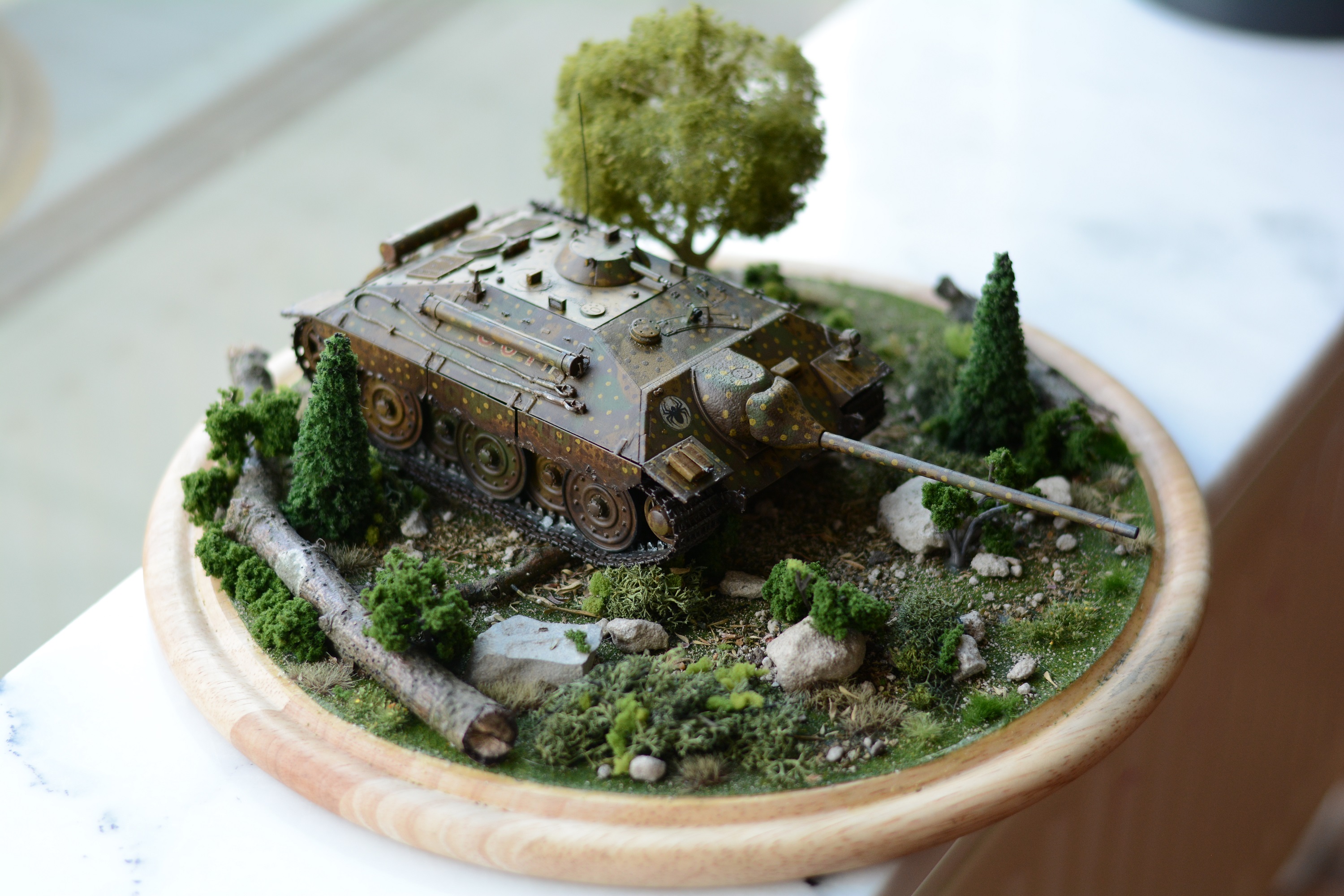
Here’s the little monster in its best angle (I think).  I’ll probably enter this photo for a contest sometime soon.  Others follow…

I’ll point to a few details to call attention to them for techniques or stuff to try to use and issues had with them:

1.  The Schurzen from the photo etch kit – paint it alongside your model, but separate from it, and mask off the pieces that will be glued to the model.  Go ahead and attach the mounts after you do the wheels, but leave the plates off until you’re ready to start adding weathering.  I can’t tell you how many times those little pricks broke free while I was moving the model.

2.  I used white stucco paste for the caked-on mud, and covered it with Mig “dark mud” and then spotted with Mig “fresh mud” effects.  Looks good, I like the color, but the white stucco required several coats to really get rid of the brilliant white beneath it.

3.  I intentionally bent some of the schurzen with pliers to look like some close calls with trees, etc.

4.  I also used Mig “streaking grime” all over in little bits here and there, then going back and lifting up most of it with a brush moistened with thinner.  When you do this, do the lift SAME DAY, preferably apply to one panel and then remove from same panel as soon as it’s done.  I let one of the schurzen sit overnight (right front), and it shows, doesn’t look as good as the others.

5.  My base hull coat was in a German dark yellow from the “Flames of War” branded paint.  This paint dissolves in acetone.  I found out somewhat harshly (but thankfully in a way that was easily fixed) when I used acetone as a fixer for a dust pigment.  Note to self:  cover the hull with satin or other varnish before weathering.

6.  Clear gloss lacquer beneath decals is a great plan, works wonderfully.  Adding decal solvents to get rid of silvering completes the “painted on” look.  Acetone can then potentially bork your decals so again, varnish after.

7.  That boxy thing on the front right fender is the baseplate for the jack – generally it should be colored as though it was painted with the tank itself (new tanks on both sides generally had their equipment attached and it got painted over, after time tools would get lost or broken and new ones that weren’t painted would be acquired).

8.  Hairspray chipping technique on the muffler to give me some rust spots underneath – good stuff, but make sure you mask the paint if you’re about to varnish the thing, or the varnish will prevent water from getting in to soften up the paint.

9.  The rolled-metal barrel is a great gripping point for when you have to handle the model without breaking fragile spots.

10.  The photo-etch grab handles along the top on either side will break and disappear if you even look at them unkindly.

11.  The radio antenna is a bit of wire painted black and super-glued into a socket on the top.  Nothing special in its construction, just added a nice complete look to the model.

12.  The whole model was coated with a brown filter for German yellow vehicles, and also with a wash designed for the same color scheme.  I then used the streaking grime in a 50/50 dilution to create a pin-wash for a few seams and hatches.

13.  A little bit of black plus steel was then sponge-applied to spots where foot traffic would go, and a little around the edges to give a chipping effect.

14.  The base is a $6 cutting board I bought from the kitchen department of TK Maxx (TJ Maxx in the US).  I glued a trimmed “grass” from Woodland Scenics to it, then sprinkled with some cement dust from a local demolition site, some tiny gravel, and then dried thyme and oregano leaves.  Smells nice, too.  A broken stick from somewhere outside added larger “tree fall” elements.  Larger gravel pieces and some trees (a few of which I trimmed branches away from the trunk to look like bushes) from various manufacturers were added after that, and finally some various grass tufts which are available from most gaming-mini stores.

So…I’m getting there.  Not totally pro, but it looks pretty damn nice sitting on the shelf.

Next up…I’ll be doing a small USS Enterprise from the old Star Trek series for a friend’s “Man Cave” and then after that, I buckle down and start on the shuttle bay for my own 1/350th Enterprise Refit!


Posted in Build Log, Model Kits, ww2 | Tagged , , , | Leave a comment

Where all men go – and from which no man has returned before

This evening, I have several times felt myself on the edge of tears over the death of Leonard Nimoy. Scenes I saw from my childhood (as in, age 5 or less) keep flashing through my mind. I think if I were to spend any length of time contemplating the message of friendship in “Wrath of Khan” I’d probably upset my own kid with being such a crybaby. I never realized how much I valued his impact on my life and growth to adulthood.

Well played, Mr. Nimoy. You managed to set a course in my life I never even knew I was pursuing. And while some might find that revelation strange, I find myself comforted, and I genuinely grieve the sudden absence I am feeling.


Posted in Uncategorized | Leave a comment

Helga the Tiger – is up for sale

Well, with shelf space at a premium here, and a new E25 on the way, I’m going to put Helga up for sale – she was a lot of fun and a good ode to World of Tanks.  I really liked the contest idea (and I’m still trying to figure out who slammed 500 votes on me practically overnight at the end there), and I think she’ll make a great addition to someone’s PC desk or bookshelf.

I’m considering something like €150 + shipping, and I’m open to offers if that seems to steep.  I’ll pack her up well and make sure she’s insured as well.  The full build log will remain here, so the new owner can see the process that went into the build.

Here’s the photo essay again for those who don’t have the link.


The one, the only - it's Helga!

The one, the only – it’s Helga!


Posted in Model Kits | Tagged , , , | Leave a comment